![WellDatabase-Rect-1000x159-1.png]](https://support.welldatabase.com/hs-fs/hubfs/WellDatabase-Rect-1000x159-1.png?height=40&name=WellDatabase-Rect-1000x159-1.png)
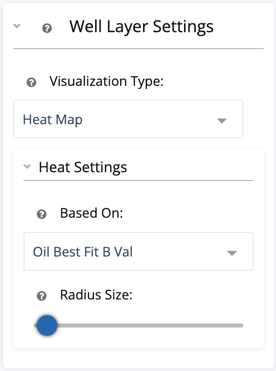
Heat maps are very useful when trying to identify broad trends on a large data set. All you need to do to make a heat map is change the Visualization Type to Heat Map. From there, just specify the property you want the heat map to be based on and set the radius size. The radius size allows you to blend spots together as it increases.
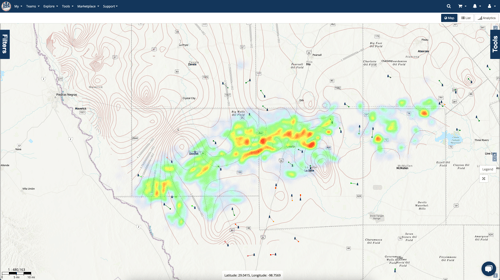
Below we have two heat maps using the same property, just with different radius sizes. The first separates out the well values where they are more distinctive.
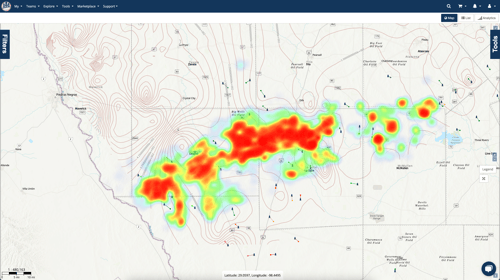
By raising the radius, we allow the larger values to bleed into each other and create a wider trend in our map area.
With all of the map options in WellDatabase, there is next to nothing you can’t do.
Subscription Requirements
Heat maps are available with Plus and Pro subscriptions.
Related Articles
- Can I create a heat map and keep my well spots?
- How do I use grid maps?
- How can I turn my current filters into a data layer?
Frequently Asked Questions
Q: What does a production heat map show?
A: A production heat map provides a visual way to identify broader production trends across wells on the map. The heat map is based on the property selected in Heat Settings.
Q: How do I create a production heat map?
A: Change the Visualization Type to Heat Map, then select the property you want to visualize and adjust the radius size.
Q: What does the radius setting change?
A: The radius controls how much nearby well values blend together. A smaller radius keeps individual values more distinct, while a larger radius blends nearby values to help show broader trends.
Q: Can I create heat maps using different production properties?
A: Yes. Use Heat Settings to select the property you want the heat map to be based on.
Q: Are heat maps available with Essential?
A: No. Heat maps are available with Plus and Pro subscriptions. They are not available with an Essential subscription or Lite account.
Explore additional articles by searching the topics on the left. If you have any questions, feel free to email support@welldatabase.com