![WellDatabase-Rect-1000x159-1.png]](https://support.welldatabase.com/hs-fs/hubfs/WellDatabase-Rect-1000x159-1.png?height=40&name=WellDatabase-Rect-1000x159-1.png)
How to Search Using the Land Grid Filter
The Land Grid filter supports multiple legal description systems, including:
- Section, Township, and Range (STR)
- Texas Survey, Block, Section, and Abstract values
How to Search by Legal Description
-
Open the Filters panel.
-
Navigate to: Geographic → Land Grid
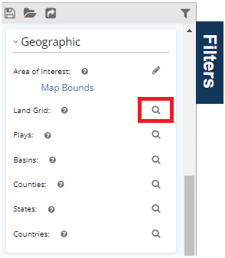
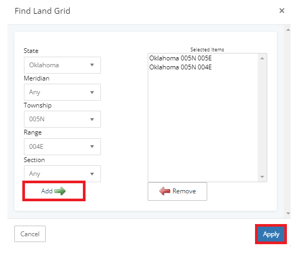
- Select the appropriate legal description values for your search area. The available fields dynamically update based on the selected state and legal description system.
- STR legal descriptions include: Meridian, Township, Range, and Section
- Texas legal descriptions may include: Survey, Block, Section, and Abstract
-
Click Add to move the selected legal description into the results section.
-
Click Apply to update your search results.
Legal Description Search Results
Once applied, wells located within the selected legal description area will display:
-
On the map
-
In the results list
-
In analytics
Related Articles
Frequently Asked Questions
Q: Why do my Land Grid filter options change by state?
A: Different states use different legal description systems. Depending on the selected state, the Land Grid filter may display STR fields or Texas Survey, Block, Section, and Abstract fields.
Q: Can I add multiple legal description selections at the same time?
A: Yes. Multiple legal description selections can be added before applying the filter.
Q: Why are no wells appearing after applying my legal description filter?
A: Verify that the correct legal description values were selected before clicking Add and Apply.
Q: Is there a way to visually confirm STR areas on the map?
A: When working with STR searches, you may find it helpful to use the Section - Township - Range overlay. See the following article for more information about adding overlays in WellDatabase: WDB Overlays.
Q: Why can’t I find a specific legal description value?
A: Verify that the correct state and legal description system were selected before searching within the Land Grid filter.
Q: What does STR stand for?
A: STR stands for Section, Township, and Range.
Q: Does Texas use Section, Township, and Range values?
A: No. Texas uses a different legal description system that includes Survey, Block, Section, and Abstract values within the Land Grid filter.
Q: Can I paste a list of abstract numbers into the Land Grid filter?
A: No. Abstract numbers cannot be pasted as a list into the Land Grid filter. To search multiple Abstracts, find and select each Abstract individually, add it to Selected Items, and then click Apply.
Q: What grid options are available on the map?
A: WellDatabase includes two grid-related map features:
- Land Grid overlays display land boundaries such as Township, Range, Section (STR), Abstracts, and Surveys.
- Grid Map displays aggregated well and production data within grid cells for visualization and analysis. A Plus or Pro subscription is required to access Grid Map.
Although both features may be referred to as a "grid," they serve different purposes. For data visualization and analysis, see the Grid Map article.
Explore additional articles by searching the topics on the left. If you have any questions, feel free to email support@welldatabase.com