![WellDatabase-Rect-1000x159-1.png]](https://support.welldatabase.com/hs-fs/hubfs/WellDatabase-Rect-1000x159-1.png?height=40&name=WellDatabase-Rect-1000x159-1.png)
Watching wells allows you to quickly return to important wells from My → Wells and manage wells you want to monitor regularly.
Watch a Well
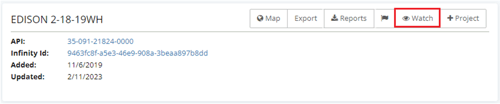
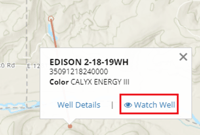
You can watch wells from either the Well Details page or directly from the map.
From the Well Details page:
From the map:
Remove a Watched Well
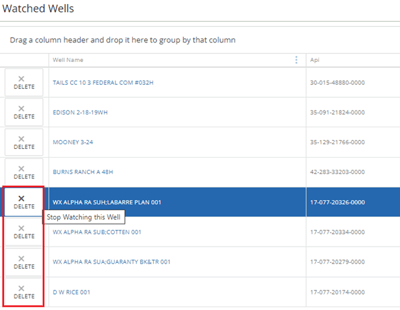
You can remove watched wells from either the Well Details page or from My → Wells.
From the Well Details page: For wells that are already being watched, the Watch button changes to Stop Watching.
From My → Wells: Go to My → Wells to view your watched wells list. Click the X next to a well name to remove it from the list.
Access Watched Wells
Go to My → Wells to access your watched wells list. Selecting a well name opens the Well Details page for that well.
Frequently Asked Questions
Q: Can I view analytics for watched wells only?
A: Yes. Go to My → Wells and click Map Wells to display analytics for wells in your watched wells list.
Q: Where can I see updates to watched wells?
A: Updates to watched wells are available in the Recent Activity section under My → Home.
Q: Can I watch more than one well?
A: Yes. Multiple wells can be added to your watched wells list.
Explore additional articles by searching the topics on the left. If you have any questions, feel free to email support@welldatabase.com