![WellDatabase-Rect-1000x159-1.png]](https://support.welldatabase.com/hs-fs/hubfs/WellDatabase-Rect-1000x159-1.png?height=40&name=WellDatabase-Rect-1000x159-1.png)
Geographic filters help narrow wells based on location and map boundaries. These filters are commonly used for land-based searches:
- State or county activity
- Plays and basins
- Township / Section / Range (STR)
- Texas Surveys & Abstracts
- Custom map search areas
Open the Geographic Filters
1. Open the Filters panel on the left side of the screen.
2. Expand the Geographic section within the Filters pane.
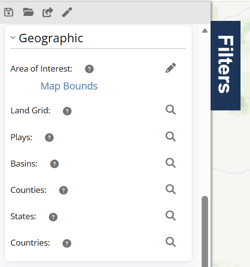
Search Using an Area of Interest (AOI)
The Area of Interest (AOI) filter allows you to limit searches to a specific geographic area. AOI searches are useful for prospect areas, offset well searches, acreage positions, and custom project boundaries.
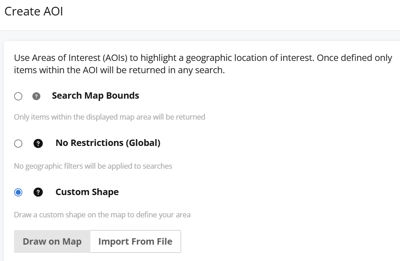
Available AOI options include:
- Search Map Bounds — searches only within the visible map area
- No Restrictions (Global) — removes geographic restrictions
- Custom Shape — draw or import a custom search boundary
For additional instructions, see:
Search Using Land Grid Filters
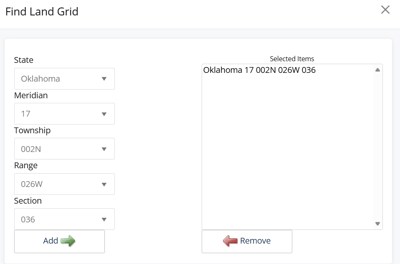
The Land Grid filter allows searches using:
- Township / Section / Range (STR)
- Texas Surveys & Abstracts
The available search fields adjust automatically based on the selected state. For example:
- Most states use Township / Section / Range
- Texas uses Surveys & Abstracts
After selecting your criteria, click Add to include the selection in your search before applying filters.
For additional instructions, see: How do I search by Section, Township and Range?
Search by Play, Basin, County, State, or Country
Use these filters to search for wells located within selected geographic regions.
-
Plays and Basins search wells by geological boundaries.
-
Counties, States, and Countries search wells by political boundaries.
Frequently Asked Questions
Q: Can I draw my own search area on the map?
A: Yes. Use the Area of Interest filter to draw a custom search boundary directly on the map.
Q: What is the Land Grid filter used for?
A: The Land Grid filter allows searches using Township/Section/Range (STR) and Texas Surveys & Abstracts.
Q: How does the Plays and Basins filters determine the well set returned?
A: Play and Basin filters search for wells within selected geological boundaries.
Q: Can I combine geographic filters with other filters?
A: Geographic filters can be combined with production, operator, formation, event date, and additional filters.
Q: What does AOI mean?
A: AOI stands for Area of Interest.
Explore additional articles by searching the topics on the left. If you have any questions, feel free to email support@welldatabase.com