![WellDatabase-Rect-1000x159-1.png]](https://support.welldatabase.com/hs-fs/hubfs/WellDatabase-Rect-1000x159-1.png?height=40&name=WellDatabase-Rect-1000x159-1.png)
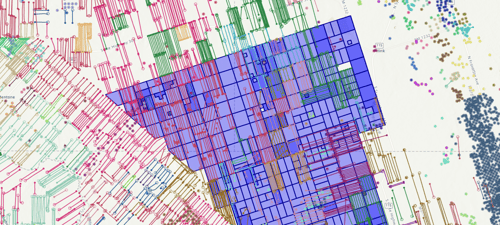
WellDatabase supports shapefiles and additional overlay types that can be added directly to the map. Up to 30 layers, including data layers, can be added to a map at one time.
The video below demonstrates the shapefile upload process in WellDatabase.
Upload a Shapefile
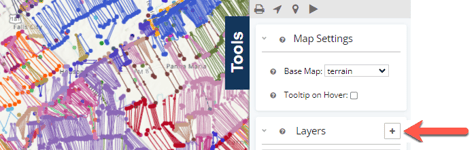
1. Open the Tools panel on the right side of the map.
2. Click the + button in the Layers section.
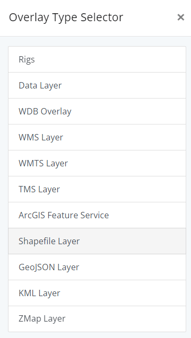
3. Select Shapefile Layer from the Overlay Type Selector.
4. Upload a .zip file containing your shapefile components.
Shapefiles typically include:
• .shp• .prj
• additional supporting files
To ensure the layer displays correctly, compress all shapefile components into a single .zip file before uploading.
5. Configure optional display settings including:
• fill color
• opacity
• interactive layer
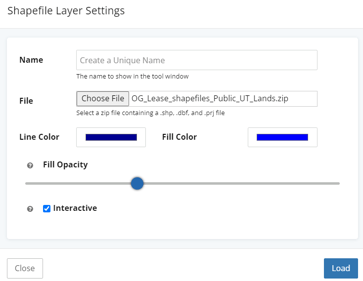
6. Click Load to add the layer to the map.
Frequently Asked Questions
Q: Are shapefile uploads available on all subscriptions?
A: Shapefile uploads are available on paid WellDatabase subscriptions, including Essential, Plus, and Pro plans. This feature is not available on Lite accounts.
Q: Do I need to upload a ZIP file?
A: Yes. Shapefile components should be compressed into a single .zip file before uploading.
Q: What shapefile components should be included in the ZIP file?
A: Most shapefiles include .shp, .dbf, .prj, and additional supporting files.
Q: Can I upload more than one layer?
A: Yes. Up to 30 layers, including data layers, can be added to a map at one time.
Q: Can I create interactive AOIs from shapefiles?
A: Yes. Polygon shapefiles can be configured as interactive layers for custom AOI creation.
Q: Can line shapefiles be converted into polygons?
A: Yes. If your shapefile contains lines or multiline strings instead of polygons, QGIS includes a Polygonize tool that can convert line-based shapes into polygons.
Q: What overlay formats are supported?
A: WellDatabase supports WMS, WMTS, TMS, ZMap, Shapefile, KML, and GeoJSON overlay formats. See related article: How do I add overlays to the map?
Q: What should I do if my shapefile will not upload correctly?
A: See related article: Why is my ZIP shapefile not uploading?