![WellDatabase-Rect-1000x159-1.png]](https://support.welldatabase.com/hs-fs/hubfs/WellDatabase-Rect-1000x159-1.png?height=40&name=WellDatabase-Rect-1000x159-1.png)
How Search Helpers Work
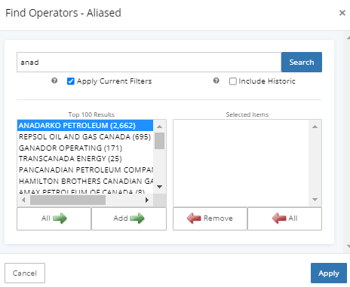
Search helpers allow you to search using partial names or values within the Filters panel. Instead of entering an exact match, WellDatabase will return results that contain the partial text entered into the search field.
Search helpers are commonly used to:
- find operators, companies, or other values more quickly
- search within large filter result lists
- locate filters within the Filters panel
Using Search Helpers Inside Filters
Many filters support partial-text searching. Instead of entering an exact value, you can enter part of a name or value to return matching results.
For example, search helpers can be used by entering part of an operator name, company name, or other searchable value.
-
Open a filter that contains a search box.
-
Enter part of the name or value you are searching for.
-
Select the matching result and click Add Selected to move it into the Selected Items section.
-
Click Apply to update your search results.
Using Search Helpers to Find Filters
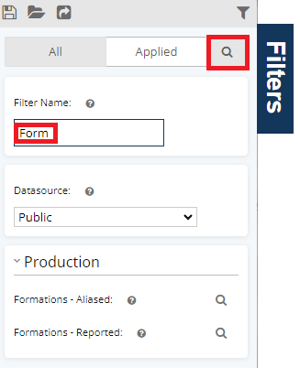
Search helpers can also be used to quickly locate filters within the Filters panel.
Instead of manually scrolling through the full filter list, enter part of the filter name into the filter search box.
Important Notes
-
Search helpers support partial-text matching using portions of a name or value.
-
Partial entries must still match part of the actual text being searched.
-
Filters initially display only the top 100 results in the filter pop-up.
-
Additional matching results can still be found by entering partial search text into the search box.
-
Results returned depend on the filter currently being searched.
Frequently Asked Questions
Q: Do I need to type the full name or value when searching filters?
A: No. Search helpers allow partial-text searching, so entering part of a name or value will return matching results.
Q: Can search helpers be used to find filters in the Filters panel?
A: Yes. The Filters panel includes a search box that allows you to quickly locate filters by entering part of the filter name.
Q: Why am I seeing multiple matching results?
A: Search helpers return all matching values associated with the partial text entered into the search field.
Q: Why am I only seeing 100 results in the search window?
A: Filters initially display only the top 100 results in the filter pop-up. Additional matching results can still be found by entering partial search text into the search box.
Q: Why is my partial search not returning the result I expected?
A: Search helpers support partial-text matching, but the entered text must still match part of the actual name or value being searched.
Q: Are search helpers available in all filters?
A: Search helper functionality is available throughout many filters in the Filters panel, particularly filters that contain searchable values or large result lists.
Explore additional articles by searching the topics on the left. If you have any questions, feel free to email support@welldatabase.com