![WellDatabase-Rect-1000x159-1.png]](https://support.welldatabase.com/hs-fs/hubfs/WellDatabase-Rect-1000x159-1.png?height=40&name=WellDatabase-Rect-1000x159-1.png)
Permit Date Filters
The Event Dates section includes two separate permit date filters:
First Permit Date: Searches based on the earliest permit associated with the well.
Last Permit Date: Searches based on the most recent permit associated with the well.
Searching for Permits Within a Date Range
To search for permits issued during a specific timeframe, use the Last Permit Date filter.
-
Open the Filters panel.
-
Navigate to the Event Dates section.
-
Enter a date range in the Last Permit Date fields.
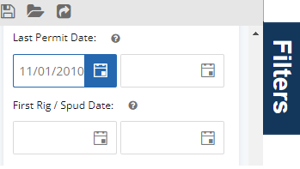
Note: If the second date field is left blank, the search will include permits from the start date through the current date.
Important Difference Between First and Last Permit Date
Using First Permit Date may exclude wells that originally received permits before the specified timeframe, even if newer permits were later issued.
For example:
- a well first permitted in 2000
- but re-permitted in 2020
would NOT appear in a First Permit Date search beginning in 2010.
Using Last Permit Date will return wells with permits issued during the selected timeframe, including re-permitted wells.
Permits Over a Specific Timeframe
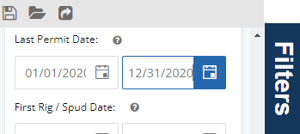
If you prefer not to include permits up to the current date, you can specify an end date by using the second date box. For example, the screenshot below will display wells that were permitted specifically in the year 2020.
Searching for Wells Ever Permitted
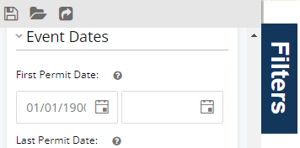
To search for all wells that have ever had a permit:
-
Enter
01/01/1900in the First Permit Date field. -
Leave the end date blank.
Important Notes
-
First Permit Date searches the earliest permit associated with the well.
-
Last Permit Date searches the most recent permit associated with the well.
-
Leaving the second date field blank searches through the current date.
-
Re-permitted wells may be excluded when using First Permit Date ranges.
Frequently Asked Questions
Q: What is the difference between First Permit Date and Last Permit Date?
A: First Permit Date searches the earliest permit associated with the well, while Last Permit Date searches the most recent permit associated with the well.
Q: Which permit date filter should I use for permits issued during a specific timeframe?
A: In most cases, Last Permit Date should be used when searching for permits issued during a specific timeframe because it includes wells that may have been repermitted.
Q: Why are some wells missing from my First Permit Date search?
A: Wells first permitted before the selected timeframe will not appear in the results, even if newer permits were later issued for the well.
Q: Does the Last Permit Date filter also include wells with only a first permit?
A: Yes. The Last Permit Date filter searches the most recent permit associated with the well. If a well has only one permit, the first and last permit dates are the same.
Explore additional articles by searching the topics on the left. If you have any questions, feel free to email support@welldatabase.com