![WellDatabase-Rect-1000x159-1.png]](https://support.welldatabase.com/hs-fs/hubfs/WellDatabase-Rect-1000x159-1.png?height=40&name=WellDatabase-Rect-1000x159-1.png)
How to Search by Original Operator
-
Open the Filters panel.
-
Locate: Original Operators - Aliased or Original Operators - Reported
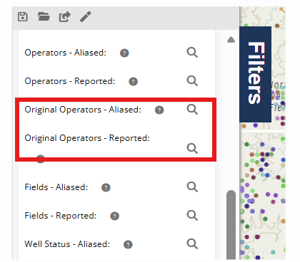
- Open the desired filter and search for the operator name.
- Highlight the operator, then click Add Selected to move the operator into the Selected Items section on the right side of the window. Click Apply to update your search results.
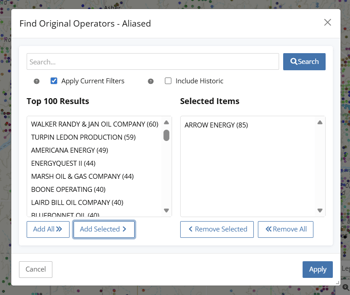
Original Operator Filters
Original Operators - Aliased
Uses WellDatabase-normalized operator naming to group related operator names together.
Original Operators - Reported
Uses the original reported operator names exactly as they were reported to the source agency.
Important Notes
-
The Operators filters return the current operator information.
-
The Original Operators filters search historical/original operator assignments instead of the current operator.
-
Separate filters are available for aliased and reported operator values.
Related Articles
Frequently Asked Questions
Q: What is the difference between current operators and original operators?
A: The standard Operators filters search the current operator associated with the well. The Original Operators filters search the historical or original operator assignments tied to the well record.
Q: What is the difference between Original Operators - Aliased and Original Operators - Reported?
A: Aliased operators use WellDatabase-normalized naming to group similar operator names together. Reported operators display the original operator names exactly as they were reported to the source agency.
Q: Can I search historical operators instead of the current operator?
A: Yes. Use the Original Operators - Aliased or Original Operators - Reported filters located within the Filters panel.
Q: Why am I not seeing filtered results after clicking Apply?
A: Before clicking Apply, the operator must first be moved into the Selected Items section using Add Selected or Add All. Operators remaining only in the search results list will not be applied to the filter.
Explore additional articles by searching the topics on the left. If you have any questions, feel free to email support@welldatabase.com