![WellDatabase-Rect-1000x159-1.png]](https://support.welldatabase.com/hs-fs/hubfs/WellDatabase-Rect-1000x159-1.png?height=40&name=WellDatabase-Rect-1000x159-1.png)
Lite is designed for users who need convenient access to public well information without searching multiple state or regulatory websites. It includes basic search, mapping, and well viewing capabilities, while advanced tools and additional data access require a paid subscription.
Included Features
With Lite, you can:
-
Search public well data using the available filters.
-
Explore wells on the interactive Map.
-
Zoom to an area on the map to view nearby wells.
-
Switch between Map, List, and Analytics views.
-
View the Overview dashboard for your current search results.
-
View state-reported well and production data. (Allocated production data requires a paid subscription.)
-
Open and view up to 50 unique well detail cards each month.
Search Filters Available With Lite
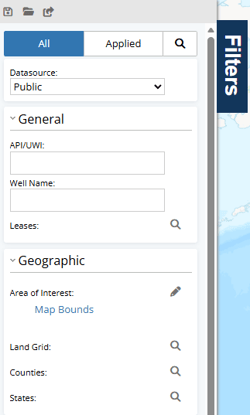
Lite includes the following search filters:
- API/UWI: Search for one API/UWI at a time. Searching multiple API/UWI values at once requires a paid plan.
- Well Name: Search for one well name at a time.
- Leases: Search for wells by lease.
- Area of Interest: Search within the current Map Bounds or select No Restrictions. Creating a Custom Area of Interest requires a paid plan.
- Land Grid: Search by land grid values, including multiple Section/Township/Range combinations or, in Texas, Surveys and Abstracts.
- Counties: Select and search multiple counties.
- States: Select and search multiple states.
Discover Additional Features
Throughout WellDatabase, features available with a paid subscription are clearly identified.
Lite includes essential search, mapping, and well viewing capabilities. As you use WellDatabase, you'll also see opportunities to unlock advanced features that support more detailed analysis and workflows.
Depending on where you are in the application, you may see:
-
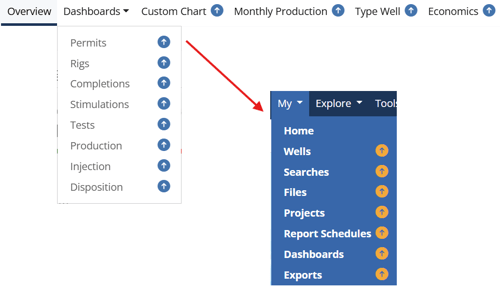
Upgrade arrows next to menu items, analytics tabs, and other features.
-
Upgrade prompts highlighting additional functionality available with a paid subscription.
-
Upgrade messages that allow you to upgrade your account.
The examples below show upgrade arrows displayed throughout the application.
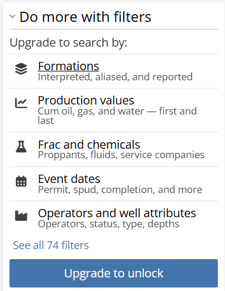
The Filters panel also highlights additional search categories that are available in a paid plan.
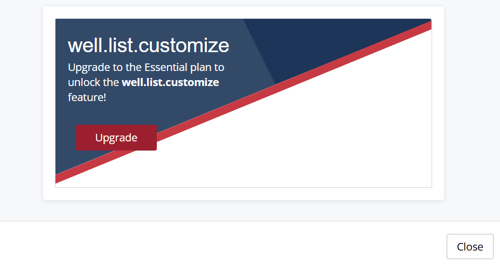
Selecting a feature that is not included with the Lite subscription will display a message showing the first subscription level where the feature is available.
Well Detail View Limit
Lite includes access to 50 unique well detail cards each month. Once you reach this limit, you will see the “Well Detail Views are currently unavailable” message when attempting to open another well detail card.
Your available well detail views reset monthly. You can also upgrade to a paid plan for unlimited well detail views.

Which plan includes the features I need?
Need additional features? Visit our Compare Plans page to compare available features, usage limits, and pricing across all WellDatabase plans.
The Compare Plans page provides a side-by-side comparison of Lite and paid plans, helping you choose the option that best fits your workflow.
Related Articles
Frequently Asked Questions
Q: Is Lite a free plan?
A: Yes. The Lite plan is free and does not expire.
Q: How many well detail cards can I view?
A: Lite users can view up to 50 unique well detail cards each month.
Q: Why am I receiving an error message that says “Well Detail Views are currently unavailable”?
A: Lite includes access to 50 unique well detail cards each month. If you have reached your monthly limit, Well Detail Views will be unavailable until your views reset or you upgrade to a paid plan. Available views reset monthly.
Q: What counts toward the monthly well detail card limit?
A: Each unique well detail card you open counts toward your monthly limit. Opening the same well multiple times during the same monthly cycle does not count as an additional view.
Q: When does my monthly well detail card limit reset?
A: Your available well detail card views reset monthly.
Q: Can I search for multiple API/UWI numbers at once with Lite?
A: No. Lite allows you to search for one API/UWI at a time. Searching for multiple API/UWI numbers at once, either through the API/UWI filter or the Well Finder filter, requires a paid plan.
Q: How do I know if a feature requires a paid subscription?
A: Features that require a paid subscription are identified throughout WellDatabase with upgrade arrows, upgrade prompts, or upgrade messages.
Q: Can I create a Custom Area of Interest with Lite (free) plan?
A: No. Lite allows you to search using Map Bounds or No Restrictions. Creating and searching a Custom Area of Interest requires a paid plan.
Q: Can I search by operator with Lite (free) plan?
A: No. Operator search is not included with Lite and requires a paid plan.
Q: Where can I compare all subscription features?
A: Visit the Compare Plans page for a complete feature-by-feature comparison of Lite and paid subscriptions.
Q: How is Lite different from a free trial?
A: Lite provides free, ongoing access to limited WellDatabase features. A free trial includes temporary access to additional features available with paid subscriptions.
Explore additional articles by searching the topics on the left. If you have any questions, feel free to email support@welldatabase.com.