![WellDatabase-Rect-1000x159-1.png]](https://support.welldatabase.com/hs-fs/hubfs/WellDatabase-Rect-1000x159-1.png?height=40&name=WellDatabase-Rect-1000x159-1.png)
WellDatabase includes an Available Data → Has Logs filter that allows you to search for wells containing publicly available log files.
Available log formats typically include:
- TIFF/TIF images
- LAS files
How to Search for Wells with Logs
-
Open the Filters panel.
-
Scroll to the Available Data section.
-
Enable Has Logs.
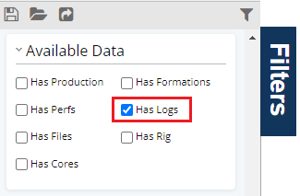
- The map and results list will update to display wells that contain publicly available logs.
How to View Available Logs
-
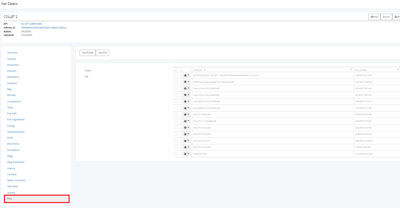
Open the Well Details page for the desired well.
-
Select the Files tab.
-
Available log files can be:
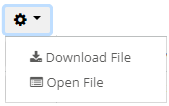
- downloaded directly
- or opened using one of the built-in viewers from the gear menu next to the file name
Important Notes
-
WellDatabase only includes publicly available logs provided by the source agency.
-
Available formats are typically TIFF/TIF image files or LAS logs.
-
LAS file viewing within WellDatabase requires a Plus or Pro subscription.
-
Log availability varies by well and by state/source agency.
Frequently Asked Questions
Q: What types of log files are available in WellDatabase?
A: Available log formats are typically TIFF/TIF image files or LAS logs.
Q: Does WellDatabase include a private library of proprietary logs?
A: No. WellDatabase only includes publicly available logs provided by source agencies, public repositories, universities, and similar public sources.
Q: Can I view or download logs with a Lite account?
A: No. Viewing and downloading files, including logs, requires a paid subscription.
Q: Can I view LAS files with all subscription plans?
A: No. Built-in LAS file viewing is available with Plus and Pro subscriptions. Essential subscriptions can still download LAS files.
Q: Why do some wells not contain logs?
A: Log availability depends on whether publicly available logs were provided for that well by the source agency or other public source.
Q: Where can I view or download available logs?
A: Available logs can be accessed from the Files tab within the Well Details page for the well.
Explore additional articles by searching the topics on the left. If you have any questions, feel free to email support@welldatabase.com