![WellDatabase-Rect-1000x159-1.png]](https://support.welldatabase.com/hs-fs/hubfs/WellDatabase-Rect-1000x159-1.png?height=40&name=WellDatabase-Rect-1000x159-1.png)
How to Access
-
Open the map.
-
Right-click near the wells you want to review.
-
Select Create Gun Barrel Plot.
-
Draw a line across the wells you want included
-
Click Finish.
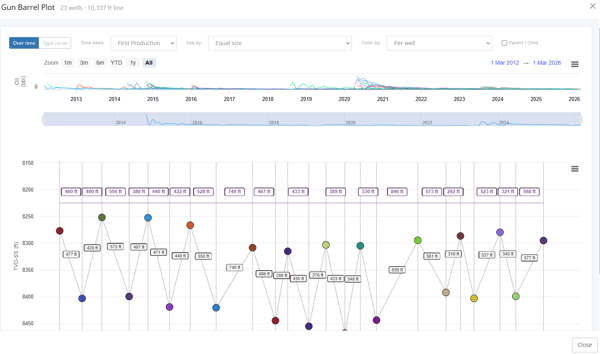
After the plot opens, you can hover over a well marker to view details such as well name, API, operator, formation, lateral length, depth, spacing, and key dates.
What the Gun Barrel Plot Shows
The Gun Barrel Plot displays wells in a side-on cross-section view. Each well is shown as a point at its true vertical depth and positioned along the line you drew on the map.
The plot can help visualize:
-
Well spacing
-
Bench stacking
-
Relative depth
-
First production timing
-
Parent/child relationships
-
Offset well layout
Plot Options
Users can adjust the plot using available controls, including:
-
Over time or Type curve view
-
Time basis such as First Production, First Completion, or First Permit
-
Size by options
-
Color by options
-
Parent / Child toggle
-
Zoom ranges and chart navigation
Why Use a Gun Barrel Plot?
The Gun Barrel Plot helps users quickly understand how wells are positioned relative to one another beneath the surface. Common uses include:
-
Review well spacing within a development area
-
Compare wells across different benches or landing zones
-
Identify potential parent/child development relationships
-
Evaluate surrounding offset activity
-
Understand the timing of nearby development
Frequently Asked Questions
Q: What is a Gun Barrel Plot?
A: Yes. Use the Gun Barrel Plot tool to create a gun barrel view from selected horizontal wells. This will give you a cross-section view of wells along a selected line. It shows each well by position and true vertical depth, helping users review spacing and bench placement.
Q: How do I create a gun barrel in WellDatabase?
A: Select the horizontal wells you want to compare, then open the Gun Barrel Plot tool. Follow the steps above to configure the plot.
Q: Why are fewer wells showing than I expected?
A: Wells may be excluded if they do not have sufficient directional survey or true vertical depth (TVD) data to be placed on the chart. Wells may also be hidden by your active map filter. If filtered wells are detected, a blue banner appears with an option to Show them anyway.
Q: Can I hover over a well for additional information?
A: Yes. Hover over any well marker to view details such as the well name, API, operator, spacing, depth, and key dates. You can also select View well details from the hover card.
Q: What subscription plans include Gun Barrel Plot?
A: Gun Barrel Plot is available on Plus and Pro subscriptions. It is not available on Essential or Lite plans.
Q: Is a gun barrel view the same as a Gun Barrel Plot?
A: In WellDatabase, the Gun Barrel Plot tool is used to create the gun barrel visualization described in this article.
Explore additional articles by searching the topics on the left. If you have any questions, feel free to email support@welldatabase.com