![WellDatabase-Rect-1000x159-1.png]](https://support.welldatabase.com/hs-fs/hubfs/WellDatabase-Rect-1000x159-1.png?height=40&name=WellDatabase-Rect-1000x159-1.png)
If an export fails, do not delete it from My → Exports.
Failed exports contain error information that allows the WellDatabase team to investigate the issue, determine the cause of the failure, and in some cases reprocess the export. If the failed export is deleted, that information is no longer available.
What should I do if my export fails?
-
Open My → Exports.
-
Confirm the failed export is still listed.
-
Do not delete the failed export.
-
Contact support@welldatabase.com to create a ticket.
Our team will review the export error information and help determine the cause of the failure.
What Support needs to troubleshoot a failed export
Before contacting Support, verify that the failed export is still visible in My → Exports.
Important: Do not delete failed exports until the issue has been reviewed by the WellDatabase team.
When a failed export remains in your export list, we can:
- Review the export error message
- Investigate the cause of the failure
- Determine whether the export can be reprocessed
- Confirm whether the issue has been resolved
If the failed export is deleted, our team cannot review the error details or reprocess the original export.
Common causes of failed exports
Temporary processing issue
Occasionally an export may fail due to a temporary processing issue. The WellDatabase team can review the export error message to determine the cause of the failure and whether the export can be reprocessed.
Monthly export allowance reached
Paid subscriptions that include export access also include monthly well export allowances. If an export would exceed the number of wells available under your subscription for the current month, the export may fail.
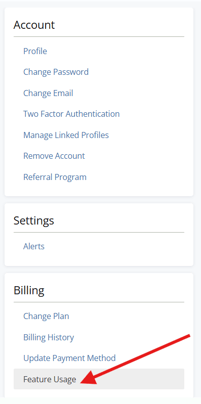
You can review your current usage by selecting the Profile icon in the upper-right corner, then navigating to Profile → Billing → Feature Usage.
Frequently Asked Questions
Q: Should I delete the failed export and try again?
A: No. Leave the failed export in My → Exports until Support has reviewed it. Deleting the export removes the information needed for troubleshooting and may prevent us from reprocessing it.
Q: Can WellDatabase review my failed export?
A: Yes. As long as the failed export remains in My → Exports, our team can review the associated error information and investigate what caused the failure.
Q: Can WellDatabase reprocess my failed export?
A: In some cases, yes. If the failed export remains in your export list, our team may be able to reprocess it after the underlying issue has been resolved.
Q: What happens if I delete the failed export?
A: Once a failed export is deleted, the associated error information is no longer available for review. Our team cannot review the error details or reprocess the original export.
Q: How do I check my monthly export allowance usage?
A: Select the Profile icon in the upper-right corner, then navigate to Profile → Billing → Feature Usage. This page displays your current usage and subscription limits.
Q: Can I export data with a Lite subscription?
A: No. Export functionality requires a paid subscription.
Explore additional articles by searching the topics on the left. If you have any questions, feel free to email support@welldatabase.com