![WellDatabase-Rect-1000x159-1.png]](https://support.welldatabase.com/hs-fs/hubfs/WellDatabase-Rect-1000x159-1.png?height=40&name=WellDatabase-Rect-1000x159-1.png)
How to Exclude Wells from Search Results
-
Run your search and review the results list.
-
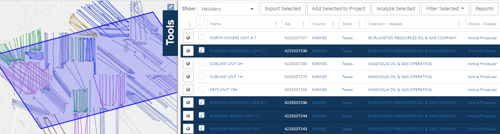
Select the wells you want to exclude using the checkboxes next to each result.
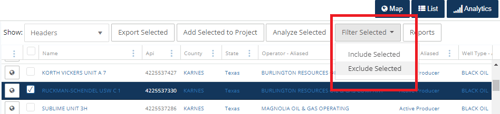
- Above the results list, open the Filter Selected dropdown and choose Exclude Selected.
-
The selected wells will immediately be removed from the:
- Map
- List
- Analytics results
Important Notes
-
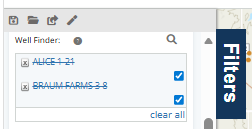
Excluding wells applies a temporary filter through the Well Finder.
-
To restore excluded wells to the results, open the Well Finder panel and click clear all.
-
Excluded wells are removed only from the current search results and are not deleted from WellDatabase.
Frequently Asked Questions
Q: Can I exclude multiple API numbers at the same time?
A: Yes. Select multiple wells from the results list, then use Filter Selected → Exclude Selected.
Q: Does excluding wells permanently remove them from my account or project?
A: No. Excluding wells only removes them from the current search results view and does not delete any data from WellDatabase.
Q: Can I exclude wells from the map and analytics views at the same time?
A: Yes. Excluded wells are removed from the map, list, and analytics results associated with the current search.
Q: How do I restore wells after excluding them from search results?
A: Excluding wells applies a temporary filter through the Well Finder filter within the Filters panel. To restore the wells to your results, open the Filters panel and click clear all in the Well Finder filter.
Explore additional articles by searching the topics on the left. If you have any questions, feel free to email support@welldatabase.com