![WellDatabase-Rect-1000x159-1.png]](https://support.welldatabase.com/hs-fs/hubfs/WellDatabase-Rect-1000x159-1.png?height=40&name=WellDatabase-Rect-1000x159-1.png)
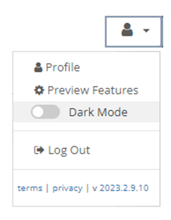
Click your profile icon in the top-right corner of WellDatabase, then toggle Dark Mode on or off.
Frequently Asked Questions
Q: Can I use a dark map without enabling dark mode for the full platform?
A: Yes. The map base layer can be changed independently from platform dark mode using the Base Map setting in the map tools panel.
Q: Does enabling dark mode change the entire platform?
A: Yes. Enabling Dark Mode changes the appearance of the WellDatabase interface across the platform.
Q: How do I turn dark mode off?
A: Click your profile icon in the upper-right corner and toggle Dark Mode off.
Explore additional articles by searching the topics on the left. If you have any questions, feel free to email support@welldatabase.com