![WellDatabase-Rect-1000x159-1.png]](https://support.welldatabase.com/hs-fs/hubfs/WellDatabase-Rect-1000x159-1.png?height=40&name=WellDatabase-Rect-1000x159-1.png)
Step 1 — Start the Signup Process
-
Go to the WellDatabase signup page: https://app.welldatabase.com/account/signup
-
If you already have an account, choose Log in instead.
Step 2 — Choose a Subscription Plan
Select the plan that best fits your needs:
-
Essential: $250.00 per month, per user.
-
Plus: $500.00 per month, per user.
-
Pro: $1000.00 per month, per user.
-
Enterprise: Email sales@welldatabase.com for pricing on our annual Enterprise plans.
You can view detailed plan features here: Compare Plans.
Tip: Discounts are available for quarterly and annual billing.
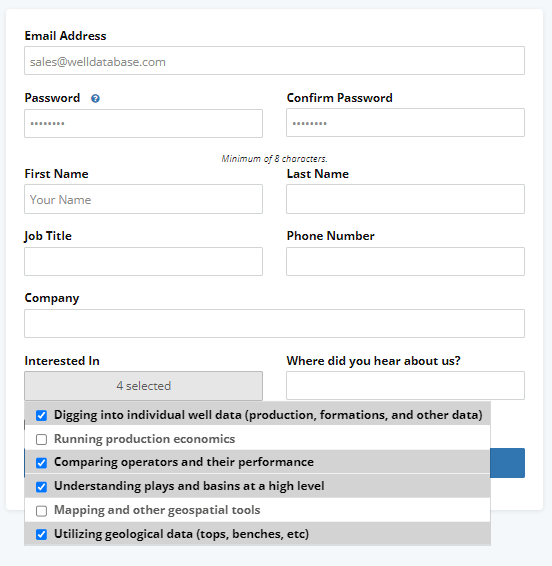
Step 3 — Enter Your Information
Then enter a small amount of information.
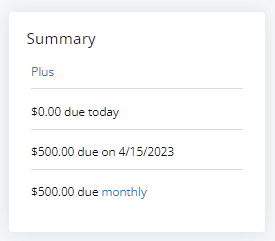
Step 4 — Enter Payment Details
And finally enter your payment information. To the right, you will see the summary of what the charges will be and when the charges will occur.
Now you are all signed up and ready to use WellDatabase.
Frequently Asked Questions
Q: Can I start with a free trial?
A: Yes — select the Start Trial option on the signup page if available. Click here to learn what features and export limits are included during a trial.
Q: What if my email is already in use?
A: Use the Forgot Password link on the login page to recover your account.
Q: Can I upgrade my plan later?
A: Yes — you can upgrade your subscription at any time from within your profile.
Q: Can someone help me choose the right plan?
A: Yes — our Customer Success team is happy to help you select the best plan for your needs. Contact us at support@welldatabase.com
Q: Is there a phone number for WellDatabase support?
A: Yes. You can contact WellDatabase at 832-698-9355.
Explore additional articles by searching the topics on the left. If you have any questions, feel free to email support@welldatabase.com