![WellDatabase-Rect-1000x159-1.png]](https://support.welldatabase.com/hs-fs/hubfs/WellDatabase-Rect-1000x159-1.png?height=40&name=WellDatabase-Rect-1000x159-1.png)
To access chart saving options, click the menu icon  in the upper-right corner of the chart.
When exporting PNG or JPEG images, the saved file automatically includes the chart legend for reference.
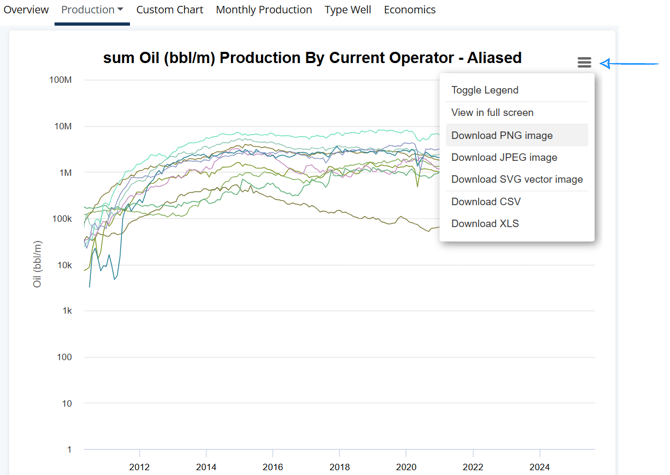
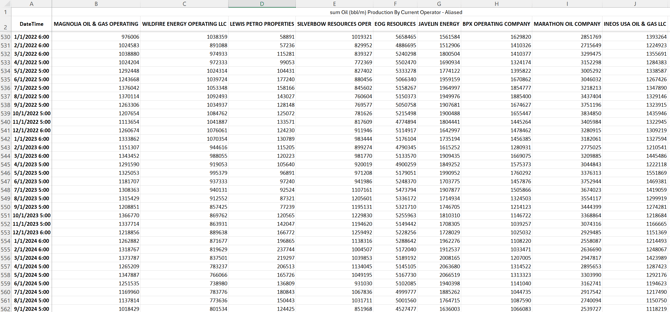
You can also export the supporting chart data using the CSV or XLS options from the same menu.
Frequently Asked Questions
Q: Where do I find my downloaded charts and tables?
A: Downloaded PNG, JPEG, CSV, and XLS files are saved directly to your computer’s default Downloads folder. These files do not appear in the WellDatabase exports area.
Q: Do chart or table exports count against my monthly export limits?
A: No. Chart images and supporting chart data exports do not count against monthly well export limits. Only exports generated through the Data Export Wizard count toward monthly export limits because those exports include underlying well data records.
Q: What data is included in a chart table export?
A: Chart table exports include the supporting data displayed behind the current chart or visualization. These exports are intended for reporting, presentations, and reference purposes rather than full raw data extraction. For a more comprehensive data export, use the Data Export Wizard to access additional data points available for the selected well(s).
Explore related articles using the topics on the left. If you need additional help, contact us at support@welldatabase.com